صيغة حديثة
مصمم لـ WebP
تقرأ تقنية OCR النص من صورة WebP الخاصة بك وتترجمه، مع الحفاظ على وضوح الصورة وخفتها وجاهزيتها للويب. يتم الحفاظ على جودة WebP الخفيفة طوال الوقت.

مجاني · أكثر من 150 لغة · بدون تسجيل
قم بتحميل صورة WEBP واحصل على ترجمة دقيقة تحافظ على التنسيق الأصلي، والتصميم، والأسلوب البصري.
اسحب الملف إلى أي مكان
أو
الصيغ المدعومة: PDF, PPTX, DOCX, XLSX, CSV, JSON, XML, YAML, EPUB, VTT, SRT, JPG, PNG, HEIC, HEIF, WEBP, MD, TXT
لماذا يختارنا الناس
ترجم النص داخل صور WebP مع الحفاظ على الرسومات عالية الجودة والخفيفة الوزن، بما في ذلك الشفافية. تقوم تقنية OCR بقراءة النص وترجمته مع الحفاظ على الصورة المدمجة والواضحة — مثالي للصور المستخدمة في المواقع الحديثة.
تقرأ تقنية OCR النص من صورة WebP الخاصة بك وتترجمه، مع الحفاظ على وضوح الصورة وخفتها وجاهزيتها للويب. يتم الحفاظ على جودة WebP الخفيفة طوال الوقت.
يتم ترجمة النص فقط — جودة صورة WebP، والشفافية، وحجم الملف الصغير كلها محفوظة. تعود الصورة جاهزة ليتم وضعها مباشرة على موقعك أو تطبيقك.
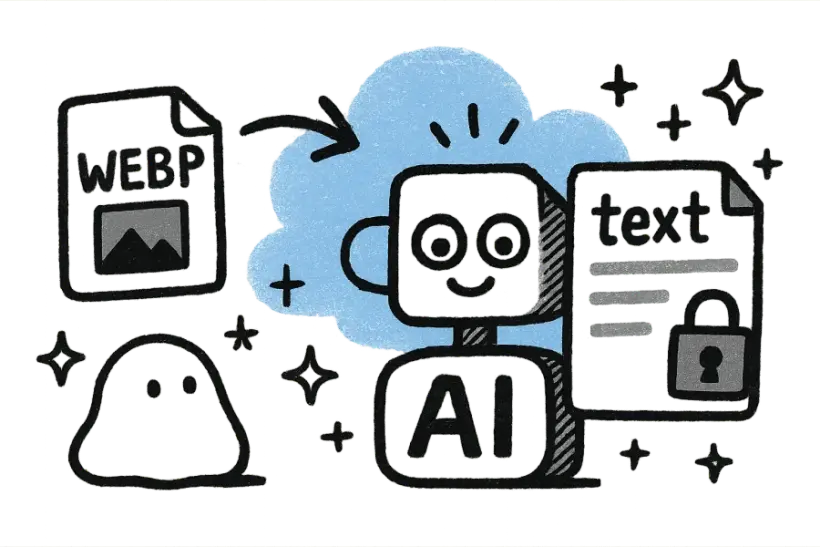
فقط قم بإسقاط ملف WebP، اختر اللغة المستهدفة، واحصل على الترجمة في ثوانٍ. لا توجد خطوة تحويل ولا حاجة لتثبيت أي شيء قبل رؤية النتيجة.
محبوب من قبل أكثر من 2 مليون مستخدم
تثق فرق الويب به لترجمة الصور التي تُستخدم في مواقعهم.
“أرفقت ملفًا ضخمًا وعاد التنسيق مثاليًا. وفر عليّ بعد ظهر كامل من النسخ واللصق.”
 Mariana Lópezمدير التوطين
“أخيرًا مترجم لا يفسد التنسيق. كل شيء مرتب تمامًا كما في الأصل.”
 David Chenمسوق منتجات
“الترجمات تبدو طبيعية، ليست آلية. عملائي حقًا لم يستطيعوا التمييز.”
 Aisha Rahmanمترجم مستقل
“حمّلت الملف وحصلت على نسخة نظيفة وجاهزة للمشاركة في أقل من دقيقة.”
 Yuki Tanakaمهندس ميكانيكي
“لا تسجيل، لا تعقيدات. فقط اسحب الملف، حمّل الترجمة، وانطلق.”
 Marco Rossiطالب دراسات عليا
“نستخدمه في الفريق بأكمله. دقة التنسيق لا تصدق.”
 Grace Okaforرئيس العمليات
“أرفقت ملفًا ضخمًا وعاد التنسيق مثاليًا. وفر عليّ بعد ظهر كامل من النسخ واللصق.”
Mariana Lópezمدير التوطين“أخيرًا مترجم لا يفسد التنسيق. كل شيء مرتب تمامًا كما في الأصل.”
David Chenمسوق منتجات“الترجمات تبدو طبيعية، ليست آلية. عملائي حقًا لم يستطيعوا التمييز.”
Aisha Rahmanمترجم مستقل“حمّلت الملف وحصلت على نسخة نظيفة وجاهزة للمشاركة في أقل من دقيقة.”
Yuki Tanakaمهندس ميكانيكي“لا تسجيل، لا تعقيدات. فقط اسحب الملف، حمّل الترجمة، وانطلق.”
Marco Rossiطالب دراسات عليا“نستخدمه في الفريق بأكمله. دقة التنسيق لا تصدق.”
Grace Okaforرئيس العملياتالأسئلة الشائعة
نعم، يتم الحفاظ على كل من الشفافية وجودة الصورة؛ يتم ترجمة النص داخل الصورة فقط. يحتفظ WebP بقناة ألفا وحجمه المضغوط، لذا لا يزال جاهزاً ليتم وضعه مباشرة على صفحة ويب.
تقوم تقنية التعرف الضوئي على الحروف (OCR) أولاً بالكشف وقراءة النص داخل صورة WebP الخاصة بك، ثم يقوم الذكاء الاصطناعي بترجمته إلى اللغة التي تختارها. هذا يعمل على التسميات، واللافتات، والتعليقات داخل الصورة على حد سواء.
يتم الاحتفاظ بالرسومات الأصلية كما هي بدلاً من إعادة رسمها، لذا لا تفقد الجودة. تركز العملية على قراءة وترجمة النص الموجود في الصورة، مع ترك الصورة نفسها دون تغيير.
يتوفر أكثر من 150 لغة، مع الكشف التلقائي عن لغة المصدر. يتم التعرف على اللغة الأصلية للنص داخل الصورة تلقائياً وترجمتها إلى اللغة التي تختارها.
يمكنك تجربتها مجاناً بدون تسجيل، وتبقى صورك خاصة. يتم تشفير الملفات أثناء النقل، وتستخدم فقط لإنتاج الترجمة، وتحذف تلقائياً بعد المعالجة.